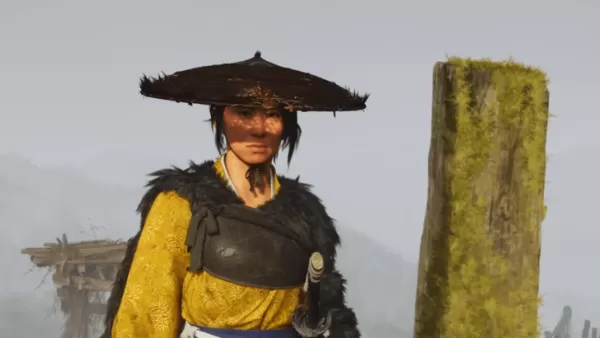
Игра Ghost of Yōtei воссоздает атмосферу классического самурайского кино благодаря своим кинематографичным фильтрам и режимам, предлагая по-настоящему глубокое погружение. Узнайте, как игра воплощает в жизнь это яркое визуальное путешествие.
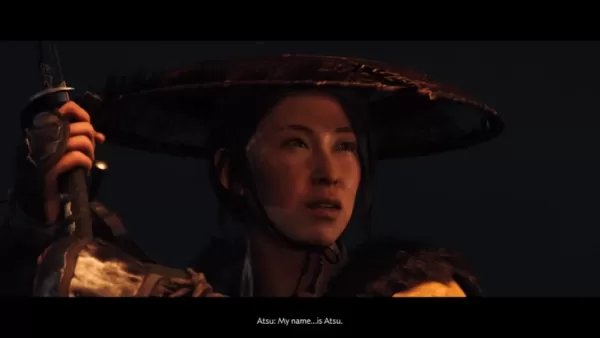
Ghost of Yōtei передает дух классического самурайского кино
Кинематографичная японская эстетика под вашим контролем

Продолжение Ghost of Tsushima, игра Ghost of Yōtei, предлагает захватывающее самурайское приключение с глубоко настраиваемым кинематографичным опытом. С помощью различных визуальных и аудио режимов игроки могут формировать приключение по своему вкусу. Как было показано во время State of Play 10 июля, игра включает несколько кинематографичных опций, которые обогащают ее обширный мир.
Разработанные в соответствии с индивидуальными предпочтениями, как объяснили креативные директора Sucker Punch Productions Джейсон Коннелл и Нейт Фокс: «Мы хотели, чтобы Ghost of Yōtei ощущалась как шаг в ваш любимый классический самурайский фильм». Игроки могут выбрать между английской озвучкой без субтитров (Стандартный режим), английской с субтитрами (С субтитрами) или аутентичной японской речью с субтитрами (Киносамурай) для полного культурного погружения.
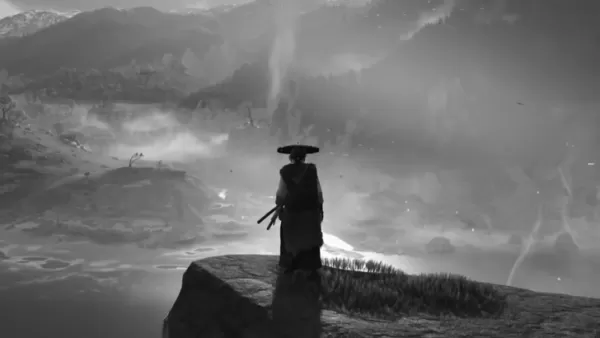
Углубляя опыт самурайского кино, Sucker Punch снова сотрудничает с наследием легендарного режиссера Акиры Куросавы, вновь представляя режим «Куросава». Этот особый режим имитирует культовую черно-белую эстетику фильмов Куросавы, включая зернистость пленки, специальный аудиофильтр и усиленные эффекты ветра.
Хотя режим «Куросава» присутствовал в предыдущей игре, Ghost of Yōtei представляет два новых кинематографичных фильтра от других мастеров жанра самураев.
Режим «Мийкэ», разработанный совместно с Такаси Мийкэ (режиссером «13 убийц»), приближает боевую камеру к протагонисту Ацу, создавая напряженное, жесткое ощущение, дополненное эффектами грязи и крови. Продюсер Синъитиро Ватанабэ (Samurai Champloo) представил режим «Ватанабэ», который накладывает оригинальные lo-fi-треки на сцены исследования и боя.
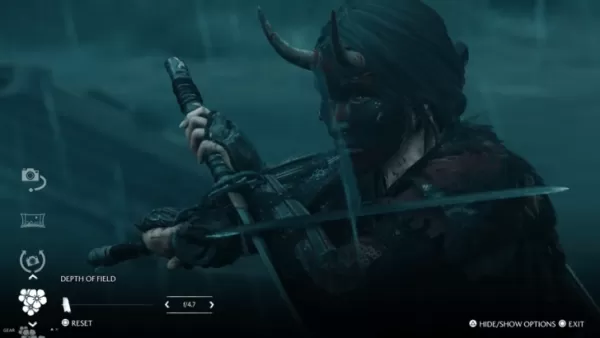
Любимая функция также возвращается в этом сиквеле. Режим фото позволяет игрокам делать потрясающие снимки в любом месте живописного мира игры. Настройка включает цветокоррекцию, время суток, погоду, выражение лица персонажа, поведение ветра и частиц, таких как летящий бамбук или осенние листья, помогая создать идеальный скриншот.
Вместе с новыми кинематографичными режимами эти функции углубляют погружение как для новых игроков, так и для ветеранов серии.
Ghost of Yōtei выйдет на PlayStation 5 2 октября 2025 года. Чтобы быть в курсе последних новостей, изучите наши связанные статьи ниже.

It seems you're referring to Machi EOS (Machi, often associated with the "Machi" character from the anime Machi Doru or other media), and you're asking about an "Offline Version" to Stay — possibly meaning you want to use Machi EOS (or a related software/character) without an internet connection, or you're looking for a way to keep it running locally.
However, there are a few clarifications needed because "Machi EOS" isn't a widely known software or application. Here are a few possibilities based on common interpretations:
🔍 1. Machi EOS – AI Character / Chatbot?
If you're referring to an AI chatbot named Machi EOS (e.g., a character from a fan-made AI project, anime-inspired bot, or a custom chatbot on platforms like Character.AI, KoboldAI, or NovelAI), then:
✅ You can run it offline using:
Local LLMs (Large Language Models) like Llama 3, Mistral, or Phi-3.
Tools like:
Oobabooga's Text Generation Web UI (supports offline local models)
LM Studio (user-friendly, runs on Windows/Mac, supports local models)
GPTQ / GGUF models (optimized for CPU/GPU, perfect for offline use)
🔹 Steps to Run Machi EOS Offline:
Download a compatible AI model (e.g., Machi_EOS-GGUF if available).
Use LM Studio or Oobabooga to load the model.
Load a character card (e.g., JSON file defining Machi's personality, voice, and dialogue style).
Run it locally — no internet required after setup.
✅ Pro tip: Look for community-made character files on platforms like Hugging Face or Reddit’s r/LocalLLaMA for pre-configured Machi-style bots.
🔍 2. Machi Doru (Machi to Doru) – Anime/Anime-Style Character
If you're referring to the anime "Machi Doru" (Machi to Doru), which features a character named Machi, and you want to stay with her "offline" (e.g., in a game, app, or mod):
You can:
Use her as a custom avatar in an offline game (e.g., Minecraft with custom skins, Roblox with local scripts).
Use her image/model in offline animation software (like Blender, Daz Studio, or Aseprite).
Create an offline chatbot or fan game using tools like Ren'Py (for visual novels).
🔍 3. Machi EOS – Misinterpretation of "EOS" (Blockchain)?
"EOS" is also a blockchain platform, but Machi EOS isn’t a known project in that space.
If you meant EOS (blockchain), then:
You can run an EOS node offline using tools like eosio with a local testnet.
But this is unrelated to "Machi" unless it's a custom project.
✅ Summary: How to "Stay Offline" with Machi EOS
Goal
Solution
Run Machi as an AI chatbot offline
Use LM Studio + GGUF model + character card
Use Machi in a game offline
Use her model/skin in a local game engine
Keep Machi character data offline
Save her profile, image, and script locally
No internet needed after setup
Yes — once model and config are loaded
🛠️ Recommended Tools for Offline Use:
LM Studio – Easy local AI chatbot (Windows/Mac)
Oobabooga – Advanced, customizable
Hugging Face – Search for "Machi" or "anime character" + "GGUF" model
NovelAI – Has offline mode (requires local storage)
💡 Final Note:
If you can clarify:
Is "Machi EOS" a specific AI bot, game, or character?
Do you have a link or model name?
Are you using Windows, Mac, or Linux?
👉 I can give you step-by-step instructions to run it completely offline and "stay" with Machi.
Let me know! 😊
As of now, there is no verified report of Dell Outlet offering an Alienware Aurora R16 with an RTX 5070 Ti for $1,575 — and for good reason.
Here’s why this claim is likely misinformation or a hoax:
1. RTX 5070 Ti Doesn’t Exist Yet
NVIDIA has not released any GPU named the RTX 5070 Ti.
The current generation of NVIDIA GPUs is the RTX 40 series (e.g., RTX 4070, 4080, 4090).
The RTX 50 series (expected to launch in 2025) has not been officially announced, so a "5070 Ti" is purely speculative.
2. Alienware Aurora R16 Is a Real Product — But Not with That GPU
The Alienware Aurora R16 is a real gaming desktop released in 2023–2024.
It typically comes with RTX 4060, 4070, 4080, or 4090 — not a non-existent 5070 Ti.
The R16 is built for the Intel 13th/14th Gen CPUs and DDR5, not future hardware.
3. Dell Outlet Pricing Is Real — But Not That Price for That Config
Dell Outlet does offer discounted Alienware systems, often with RTX 4070 or 4080.
A well-configured Aurora R16 with RTX 4070 might be priced around $1,500–$1,800, depending on CPU, RAM, and storage.
But $1,575 for a non-existent RTX 5070 Ti is not plausible.
✅ What You Should Do:
Check the official Dell Outlet website (https://www.dell.com/outlet) for real deals.
Look for real RTX 4070 or 4080 models in the Aurora R16.
Be cautious of social media posts, Reddit threads, or forums claiming "RTX 5070 Ti" deals — these are often scams or clickbait.
🔍 Bottom Line:
❌ No, Dell Outlet is not selling an Alienware Aurora R16 with an RTX 5070 Ti for $1,575.
✅ Yes, Dell Outlet does sell real Alienware R16 systems with RTX 4070/4080 for under $2,000 — but not with future GPUs.
Always verify deals through official sources to avoid scams.
Let me know if you’d like help finding a real, discounted Aurora R16 build!