

Application Description
ZGfit: Your Smart Wristband Companion for Health and Fitness Tracking
ZGfit is a user-friendly app designed to seamlessly integrate with your smart wristband, providing comprehensive health and fitness tracking. Monitor your daily activity, sleep patterns, and heart rate effortlessly, all while enjoying a smooth and intuitive user experience. ZGfit empowers you to achieve your fitness goals by offering insightful data and progress tracking.
Key Features of ZGfit:
❤ Effortless Connectivity: Maintain a constant connection between your sports watch and your smartphone for uninterrupted notifications and calls, even during workouts.
❤ Data Synchronization: ZGfit efficiently syncs your health data and exercise routines from your compatible sports watch, giving you a complete picture of your fitness progress.
❤ Broad Compatibility: Compatible with over 2,000 devices, including popular brands like Samsung, Xiaomi, and Huawei, ensuring compatibility across a wide range of smartphones and tablets.
Frequently Asked Questions (FAQs):
❤ Is ZGfit free?
Yes, ZGfit is free to download from the Google Play Store. No registration or login is required.
❤ What sports watches are compatible?
ZGfit is specifically designed for H7, H8, H9, and other compatible sports watches. Compatibility with all sports watches is not guaranteed.
❤ Is ZGfit available worldwide?
ZGfit's availability may be subject to country-specific restrictions or device limitations on the Google App Store. Please check for any restrictions based on your location and device.
How to Use ZGfit:
- Download: Install the ZGfit app from your device's app store.
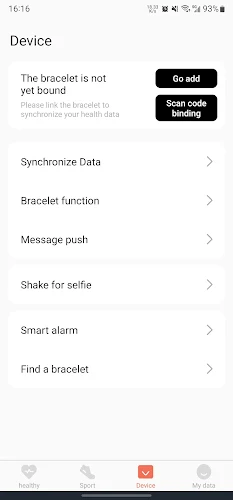
- Pair: Turn on your ZGfit wristband and pair it with the app via Bluetooth.
- Sync: Ensure your app syncs with your wristband to accurately track your data.
- Set Up Profile: Input your personal details (age, weight, height) for accurate tracking.
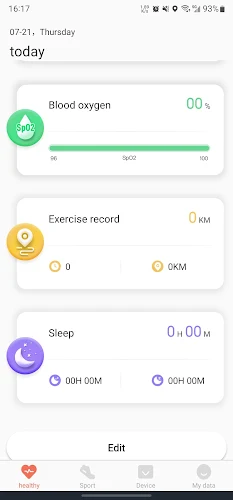
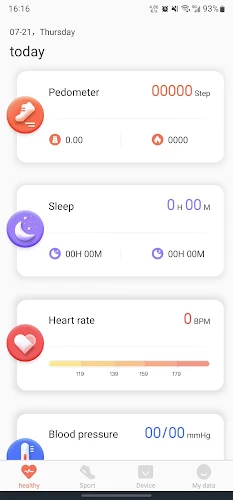
- Explore: Use the app's dashboard to view your daily steps, calories burned, heart rate, and sleep quality.
- Customize: Set personal fitness goals and customize your wristband's notification settings.
- Check In: Regularly check the app to monitor your progress and maintain motivation.
ZGfit Screenshots
Reviews
Post Comments
Trending Games
Trending apps









Topics
More
Top-Rated Productivity Tools to Boost Your Workflow
Mind-Bending Puzzle Games for Android
Best Productivity Apps to Boost Your Efficiency
Offline Puzzle Games to Play Anytime
Explore the World of Arcade Games
Best Casino Games Online
Beauty Apps: Your Guide to Stunning Looks
Top Rated Strategy Games on Google Play
Latest Articles
More