Разблокировка PlayStation VR2 на ПК: комплексное руководство
Для владельцев PS VR2, стремящихся изучить обширную библиотеку SteamVR, официальный адаптер на ПК за 60 долларов открывает мир возможностей. Однако соединение не всегда просто. Будучи продаваемым в качестве подключения и игры, в зависимости от настройки вашего ПК может потребоваться некоторая конфигурация.
Основные требования
Прежде чем начать, убедитесь, что у вас есть:
- Гарнитура PlayStation VR2
- PlayStation VR2 PC Adapter (включает в себя адаптер переменного тока и кабель USB 3.0 Type-A)
- DisplayPort 1.4 Кабель (продается отдельно)
- Бесплатный USB 3.0 Type-A Port на вашем компьютере (в то время как Sony консультируется против расширения или внешних концентраторов, может работать внешний концентраторPowered).
- Возможности Bluetooth 4.0 (встроенный или через внешний адаптер, такой как ASUS BT500)
- Steam и Steamvr установлен
- Приложение PlayStation VR2 установлено на Steam
- Два порта и кабели зарядки USB-C для контроллеров смысла (или зарядка Sony)
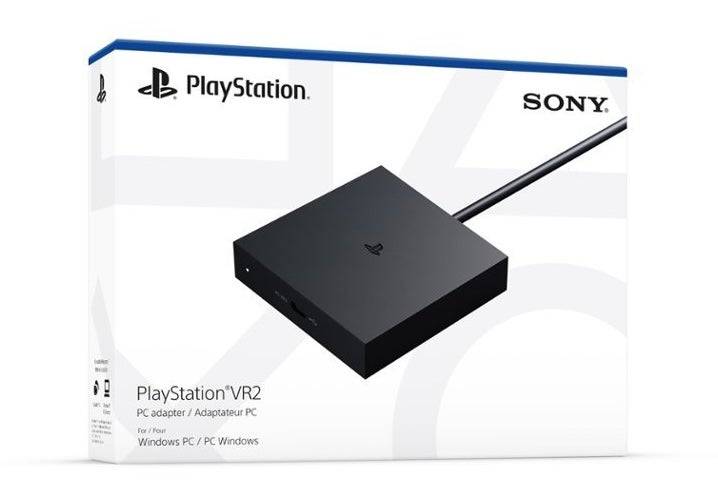
Проверьте совместимость вашего ПК, используя официальную страницу подготовки адаптера PS VR2 от Sony, прежде чем продолжить.
Пошаговое руководство по подключению
- Установка программного обеспечения: Установите Steam, SteamVR и приложение PlayStation VR2.
- Bluetooth Suaring: Включите Bluetooth на вашем ПК. На каждом контроллере смысла удерживайте PlayStation и создайте кнопки, пока свет не моргнет. Добавьте их в виде устройств Bluetooth на вашем компьютере. При использовании внешнего адаптера Bluetooth вместе со встроенным, отключите встроенный драйвер в диспетчере устройств.
- Подключите адаптер питания переменного тока. Индикатор адаптера станет сплошным красным при включении. Подключите гарнитуру PS VR2 к порту USB-C адаптера.
- Перезагрузите свой компьютер после этого.
- Запуск и настройка: Питание на гарнитуре PS VR2. Запустите SteamVR, установив его как время выполнения OpenXR. Откройте приложение PlayStation VR2 для обновления прошивки контроллера и настроить свою игровую область, IPD и расстояние отображения.
- Наслаждайтесь! После завершения настройки вы готовы играть в игры SteamVR.
Соединение без адаптера?
В настоящее время прямое соединение PS VR2 с ПК без адаптера ненадежно. В то время как некоторые пользователи сообщают о успехе с конкретными графическими процессорами эпохи 2018 года, в которых участвуют Virtuallink и порт USB-C (как отмечено на дороге к виртуальной реальности), это не гарантированный метод. Адаптер остается официально поддерживаемым и наиболее надежным вариантом.

As of now, there is no official announcement from Select Toys (a division of Toy Biz and part of Takara Tomy/Hasbro) regarding a new Jeff the Land Shark statue. However, given the popularity of Marvel’s Guardians of the Galaxy and the cult following of Jeff, the lovable and slightly menacing land shark, a statue release is not outside the realm of possibility.
That said, if you're seeing news about a "Jeff the Land Shark Statue" from Diamond Select Toys, it's likely a rumor, misinterpretation, or speculative fan content. Diamond Select Toys has previously released several collectible statues based on Marvel characters, including members of the Guardians of the Galaxy like Peter Quill, Gamora, and Rocket. A figure of Jeff the Land Shark would be a fun and quirky addition to their lineup, especially given his popularity in the Marvel Cinematic Universe.
For accurate updates, always check:
The official Diamond Select Toys website
Their social media channels (Instagram, Facebook, Twitter/X)
Marvel merchandise announcements via official Marvel or Hasbro channels
In summary:
❌ No confirmed Jeff the Land Shark statue has been unveiled by Diamond Select Toys.
✅ But a future release remains possible—especially as a limited or exclusive variant.
Keep an eye on official channels for any real announcements! 🦈✨
The phrase "What It Means" in the context of "SVP" (which stands for "Sincerely, Your Pal" or more commonly, "Senior Vice President" in a business setting) depends heavily on the tone, context, and intended audience.
Here’s a breakdown of possible interpretations:
1. If "SVP" refers to "Senior Vice President" (Corporate/Business Context)
"What It Means" could be the title of a presentation, article, or discussion about the role, responsibilities, and significance of a Senior Vice President in an organization.
Meaning: It may explore what being an SVP entails—leadership, strategic decision-making, managing large teams, reporting to the C-suite, and shaping company direction.
Example Use:
"What It Means to Be an SVP: Leadership at the Executive Level"
This would discuss the power, pressure, and prestige associated with the role.
2. If "SVP" stands for "Sincerely, Your Pal" (Casual/Friendly Context)
This is a playful or affectionate sign-off, often used in emails, notes, or social media.
"What It Means" could be a humorous or heartfelt reflection on the sentiment behind the phrase.
Example Use:
"What It Means to Sign Off as 'SVP' – A Love Letter to Friendships"
This might explore how small, personal gestures in communication can strengthen bonds.
3. In Pop Culture or Social Media
The phrase "SVP" has occasionally been used as a joke or meme, especially online.
"What It Means" could be the title of a satirical video, post, or commentary on internet culture, like:
A mock-serious analysis of why people sign emails "SVP."
A comedic take on misusing corporate titles.
Summary
Context
Meaning of "SVP"
Interpretation of "What It Means"
Corporate
Senior Vice President
A deep dive into the role, influence, and expectations of an SVP
Personal
Sincerely, Your Pal
A warm, humorous, or reflective piece on friendship and communication
Internet/Meme
Playful or ironic use
Satirical or creative commentary on language or culture
If you have a specific context (e.g., an email, a book title, a video, a tweet), I can give a more precise interpretation. Let me know!