Беспроводной контроллер GameSir Super Nova теперь доступен на Amazon по стартовой цене $47.49, включая бесплатную доставку после скидки в 5%. Для контроллера с джойстиками и триггерами на эффекте Холла, поддержкой трех режимов подключения, программируемыми кнопками и в комплекте с док-станцией для зарядки — это отличное предложение.
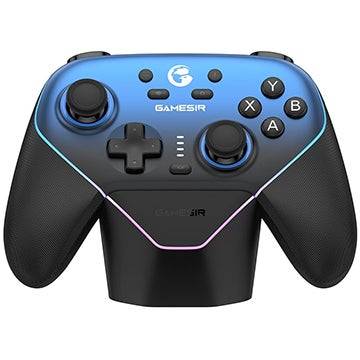
Знакомство с беспроводным игровым контроллером GameSir Super Nova

Совместимость с PC, Switch, iOS и Android
GameSir Super Nova Беспроводной Игровой Контроллер
Обычная цена: $49.99 | Скидка 5% | Сейчас: $47.49 на Amazon
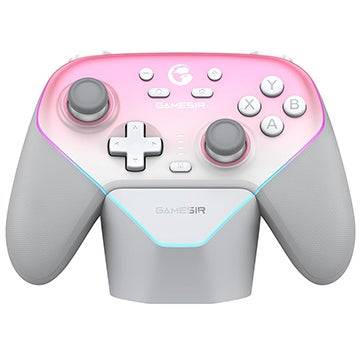
GameSir Super Nova Беспроводной Игровой Контроллер
Обычная цена: $49.99 | Скидка 5% | Сейчас: $47.49 на Amazon
GameSir Super Nova работает с PC, Nintendo Switch, а также мобильными устройствами на iOS или Android, поддерживая три типа подключения: Bluetooth, беспроводное 2.4 ГГц и проводное через USB-C. Для наименьшей задержки и частоты опроса 1000 Гц используйте подключение по 2.4 ГГц или проводное.
В отличие от многих стандартных контроллеров, Super Nova использует датчики на эффекте Холла в джойстиках и триггерах, чтобы предотвратить дрифт. Стики оснащены антифрикционными кольцами, а триггеры позволяют переключаться между коротким и длинным ходом. Программируемые тыльные кнопки и сменная раскладка ABXY дают вам полный контроль над настройкой. Контроллер питается от аккумулятора ёмкостью 1000 мАч и поставляется с удобной док-станцией для зарядки на пого-пинах.
Дополнительные функции включают тихие мембранные кнопки, прорезиненные рукоятки, съёмные панели, RGB-подсветку, регулируемую двойную вибрацию, 6-осевой гироскоп и настройку мёртвой зоны.
Предыдущие обзоры контроллеров GameSir
GameSir X2s Mobile Controller | GameSir T4 Cyclone Pro Controller | GameSir X2 Pro Mobile Controller | GameSir G8 Plus Mobile Controller
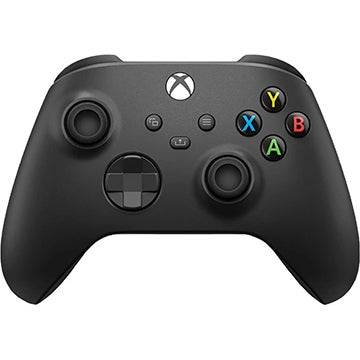
Интересует контроллер первого производителя?

Угольно-чёрный
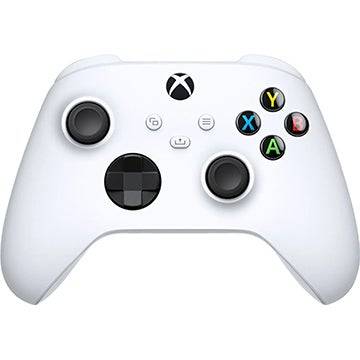
Беспроводной контроллер Xbox
4$59.99 скидка 35%$39.00 в Walmart
Роботизированный белый
Беспроводной контроллер Xbox
2$54.99 скидка 29%$39.00 в Walmart
Walmart теперь предлагает официальные беспроводные контроллеры для Xbox Series X|S всего за $39 с бесплатной доставкой. Цены со скидкой действуют на цвета "Угольно-чёрный" и "Роботизированный белый". Товары продаются напрямую Walmart, а не сторонним продавцом. Это отличная цена для премиального контроллера для игр на Xbox или PC.
Изучите другие лучшие предложения дня от IGN.
Почему можно доверять команде по скидкам IGN?
Имея совокупный опыт более 30 лет, команда по скидкам IGN находит лучшие предложения в игровой индустрии, технологиях и других сферах. Наша цель — выделять реальные выгоды на продуктах, которым мы доверяем и которые используем сами, никогда не навязывая ненужных покупок. Узнайте больше о нашем процессе в наших стандартах работы со скидками или следите за IGN Deals в Twitter, чтобы быть в курсе последних предложений.

It seems you're referring to Machi EOS (Machi, often associated with the "Machi" character from the anime Machi Doru or other media), and you're asking about an "Offline Version" to Stay — possibly meaning you want to use Machi EOS (or a related software/character) without an internet connection, or you're looking for a way to keep it running locally.
However, there are a few clarifications needed because "Machi EOS" isn't a widely known software or application. Here are a few possibilities based on common interpretations:
🔍 1. Machi EOS – AI Character / Chatbot?
If you're referring to an AI chatbot named Machi EOS (e.g., a character from a fan-made AI project, anime-inspired bot, or a custom chatbot on platforms like Character.AI, KoboldAI, or NovelAI), then:
✅ You can run it offline using:
Local LLMs (Large Language Models) like Llama 3, Mistral, or Phi-3.
Tools like:
Oobabooga's Text Generation Web UI (supports offline local models)
LM Studio (user-friendly, runs on Windows/Mac, supports local models)
GPTQ / GGUF models (optimized for CPU/GPU, perfect for offline use)
🔹 Steps to Run Machi EOS Offline:
Download a compatible AI model (e.g., Machi_EOS-GGUF if available).
Use LM Studio or Oobabooga to load the model.
Load a character card (e.g., JSON file defining Machi's personality, voice, and dialogue style).
Run it locally — no internet required after setup.
✅ Pro tip: Look for community-made character files on platforms like Hugging Face or Reddit’s r/LocalLLaMA for pre-configured Machi-style bots.
🔍 2. Machi Doru (Machi to Doru) – Anime/Anime-Style Character
If you're referring to the anime "Machi Doru" (Machi to Doru), which features a character named Machi, and you want to stay with her "offline" (e.g., in a game, app, or mod):
You can:
Use her as a custom avatar in an offline game (e.g., Minecraft with custom skins, Roblox with local scripts).
Use her image/model in offline animation software (like Blender, Daz Studio, or Aseprite).
Create an offline chatbot or fan game using tools like Ren'Py (for visual novels).
🔍 3. Machi EOS – Misinterpretation of "EOS" (Blockchain)?
"EOS" is also a blockchain platform, but Machi EOS isn’t a known project in that space.
If you meant EOS (blockchain), then:
You can run an EOS node offline using tools like eosio with a local testnet.
But this is unrelated to "Machi" unless it's a custom project.
✅ Summary: How to "Stay Offline" with Machi EOS
Goal
Solution
Run Machi as an AI chatbot offline
Use LM Studio + GGUF model + character card
Use Machi in a game offline
Use her model/skin in a local game engine
Keep Machi character data offline
Save her profile, image, and script locally
No internet needed after setup
Yes — once model and config are loaded
🛠️ Recommended Tools for Offline Use:
LM Studio – Easy local AI chatbot (Windows/Mac)
Oobabooga – Advanced, customizable
Hugging Face – Search for "Machi" or "anime character" + "GGUF" model
NovelAI – Has offline mode (requires local storage)
💡 Final Note:
If you can clarify:
Is "Machi EOS" a specific AI bot, game, or character?
Do you have a link or model name?
Are you using Windows, Mac, or Linux?
👉 I can give you step-by-step instructions to run it completely offline and "stay" with Machi.
Let me know! 😊
As of now, there is no verified report of Dell Outlet offering an Alienware Aurora R16 with an RTX 5070 Ti for $1,575 — and for good reason.
Here’s why this claim is likely misinformation or a hoax:
1. RTX 5070 Ti Doesn’t Exist Yet
NVIDIA has not released any GPU named the RTX 5070 Ti.
The current generation of NVIDIA GPUs is the RTX 40 series (e.g., RTX 4070, 4080, 4090).
The RTX 50 series (expected to launch in 2025) has not been officially announced, so a "5070 Ti" is purely speculative.
2. Alienware Aurora R16 Is a Real Product — But Not with That GPU
The Alienware Aurora R16 is a real gaming desktop released in 2023–2024.
It typically comes with RTX 4060, 4070, 4080, or 4090 — not a non-existent 5070 Ti.
The R16 is built for the Intel 13th/14th Gen CPUs and DDR5, not future hardware.
3. Dell Outlet Pricing Is Real — But Not That Price for That Config
Dell Outlet does offer discounted Alienware systems, often with RTX 4070 or 4080.
A well-configured Aurora R16 with RTX 4070 might be priced around $1,500–$1,800, depending on CPU, RAM, and storage.
But $1,575 for a non-existent RTX 5070 Ti is not plausible.
✅ What You Should Do:
Check the official Dell Outlet website (https://www.dell.com/outlet) for real deals.
Look for real RTX 4070 or 4080 models in the Aurora R16.
Be cautious of social media posts, Reddit threads, or forums claiming "RTX 5070 Ti" deals — these are often scams or clickbait.
🔍 Bottom Line:
❌ No, Dell Outlet is not selling an Alienware Aurora R16 with an RTX 5070 Ti for $1,575.
✅ Yes, Dell Outlet does sell real Alienware R16 systems with RTX 4070/4080 for under $2,000 — but not with future GPUs.
Always verify deals through official sources to avoid scams.
Let me know if you’d like help finding a real, discounted Aurora R16 build!