Assassin’s Creed Shadows: How to Get Animals in Hideout
Author: Violet
Jan 13,2026


After unlocking the Hideout in Assassin's Creed Shadows, players can personalize their space by adding pets and other animals for companionship. Here's how to populate your Hideout with animals.
Whenever Naoe or Yasuke interact with a new breed of cat or dog in Assassin's Creed Shadows, you'll unlock that animal for your Hideout. The game features various dogs, puppies, cats, and kittens available for adoption - including the stray featured in the pre-order DLC mission "Thrown to the Dogs."
Yasuke can additionally unlock small wildlife by sketching them during exploration. Rabbits, fox cubs, tanukis, and monkeys are among the creatures you might discover and document. These can later be added to your Hideout collection.
Merchants across Japan also offer farm animals like oxen and goats for purchase using mon currency.
RELATED: Where to Find the Cat Island in Assassin's Creed Shadows
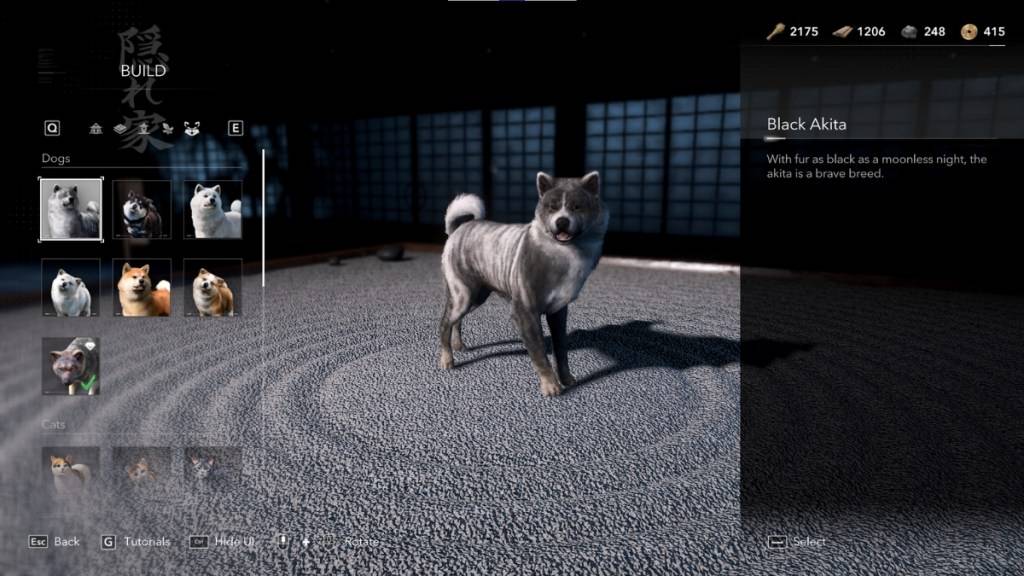
Navigate to the Hiroma building bench to access Hideout customization. Select build mode and tab over to the wolf icon on the right to view your unlocked animals, categorized as dogs, cats, and "other."
Choose your desired animal to activate an overhead view of the Hideout for placement. While you can position animals freely, they'll roam independently once gameplay resumes.
With the exception of the "Thrown to the Dogs" companion, you can place multiple duplicates of any animal. The game imposes a total animal capacity, so plan your selections accordingly. Animals can be removed or replaced anytime through build mode.
Now you're ready to transform your Hideout into a lively sanctuary.
Assassin's Creed Shadows is currently available on PC, PlayStation 5, and Xbox Series X|S.